Sunday, 4 December 2016

Different between public JRE and private JRE

Different between public JRE AND private JRE

  • Private JRE is always being available in the JDK and Public JRE is available outside the JDK.
  • By using private JRE we can run any .class file directly but executable file can’t be run in the private JRE.
After the installation of JDK the home folder will be C drive program file.
C:\Program Files\Java\jdk 1.8.0


  • Tools under the JDK
C:\Program Files\Java\jdk 1.8.0\bin

  • Private JRE under the JDK
C:\Program Files\Java\jdk 1.8.0\jre

  • JVM in the JRE
C:\Program Files\Java\jdk 1.8.0\jre\bin

  • Library in the JRE
C:\Program Files\Java\jdk 1.8.0\jre\lib\rt.jar

  • In JDK is 32 bit version then will be installed in the program files(x86).
  • In JDK is 64 bit version then will be installed in the program files.

  • In the JRE\bin there is exe named java.exe that it use to start the JVM.
  • JVM is not the single files but it is the collective from of the multiple .dll files and .exe files exist in the JRE\bin.
  • JAR is the tool in the JDK which is used to compress the contents of the folder and makes the .jar file.
  • rt.jar is the compressed file that contains the java library class.

What is JDK and JRE

JDK (JAVA DEVELOPMENT KIT)

  • JDK is the setup of java that contains a development tools and JRE (Java Runtime Environment). There are the different versions of JDK.
  • First version was JDK 1.0 launched in the November 1995 and the latest version is JDK 8 in the March 2014.
  • JDK is used by the developers to develop the application in java.

JDK = TOOL + JRE

JRE (JAVA RUNTIME ENVIRONMENT)
  • JRE is also the setup separated from the JDK that means JRE can also be installed and uninstalled separately.
  • The software applications developed in java can never be executed without the JRE. JRE contains the libraries and JVM.
JRE = LIBRARIES + JVM
VERSION OF JDK
JDK versions

The Role of Compiler in C/C++ vs. JAVA.

The Role of Compiler in case of C/C++.
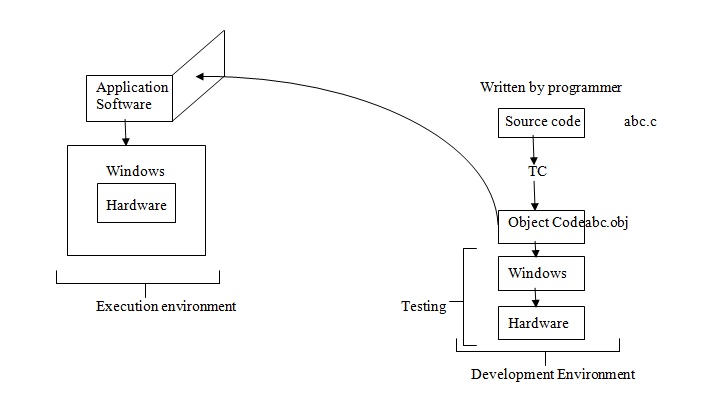
  • In any technology is to prepare the codes for the execution corresponding to the platform. The compiler of C language always prepares the code for the any specific Operating System.
  • Turbo C always prepares the code for the windows Operating System.
C/C++ Compilation process
JAVA Compilation
  • Platform Independent application software is the software that can be run on the any platform. When the compiler on the technology does not generate the code specifically for any platform then the code is consider as the platform independent.
  • In case of java the compiler never reads the code for any Operating System the java compilers create the codes for JVM.
  • Java compiler generates the .class file that contains the write byte code. Byte code is not native to any Operating System rather it is native to JVM.
JAVA compilation process
  • There are the different JVM for the different operating system. JVM can be installed or uninstalled separately.


Friday, 2 December 2016

What is Programming Language and its types.

Programming Language
A programming language is a formal computer language designed to communicate instructions to a machine, particularly a computer. Programming languages can be used to create programs to control the behaviour of a machine or to express algorithms.

The earliest known programmable machine preceded the invention of the digital computer and is the automatic flute player described in the 9th century by the brothers Musa in Baghdad, "during the Islamic Golden Age". From the early 1800s, "programs" were used to direct the behaviour of machines such as Jacquard looms and player pianos. Thousands of different programming languages have been created, mainly in the computer field, and many more still are being created every year. Many programming languages require computation to be specified in an imperative form (i.e., as a sequence of operations to perform), while other languages use other forms of program specification such as the declarative form (i.e. the desired result is specified, not how to achieve it).

Program
  • Program is the nothing but it is the plan that contains the seat of instructions for fulfilling any specific job.
  • Programming language are the languages that are used for communication between the programmer and computer system in the written way.
  • Programming language is the language use to write the program.


There are two types of programming language
  1. Low Level Programming Language:  Low Level Programming Language can directly interact with the hardware.
  2. High Level Programming Language: High Level Programming Languages never interact with hardware. Directly rather interacts with the low level language.
Low Level Language: ------------------- System Software
High Level Language: ------------------ Application Software

Application Software can be of two types
  1. Platform Dependent: 

  • If any Application Software is dependent then it can only be onto the Platform for which it was developed.
  •       If any software is developed for the windows operating system then can’t be run onto any other
          operating system.
      NOTE:- How any software becomes the platform dependent?
  •      The compiler of the technology is either platform dependent or independent.